Create New Watchlists
What Are Watchlists?
Watchlists let you focus the Live Scanner on the symbols you actually want to trade. Instead of scanning all 600+ available symbols, you can create custom lists that filter out stocks and ETFs you’re not interested in.
This saves time and keeps your scanner results relevant to your trading style.
Why Use Custom Watchlists
The ORB Setups scanner refreshes every 2 seconds across 5-minute, 15-minute, and 30-minute opening range timeframes. With 600+ symbols available, that’s a lot of data coming through.
Watchlists help you:
- Focus on familiar symbols that you understand and trade regularly
- Filter by sector or strategy to match your trading approach
- Track your portfolio holdings for ORB levels on positions you already own
- Reduce noise by removing symbols you never trade
Pro Tip: Use Watchlists for Portfolio Management
Import all the stocks from your existing portfolio. This way, you can spot opening range breakouts on positions you already hold. You can use ORB levels like the half target and full target to plan profit-taking, or identify opportunities to sell covered calls during the trading day.
Built-In Watchlists
ORB Setups includes 3 pre-built index watchlists to help you get started:
- S&P 500 for large-cap stocks
- NASDAQ 100 for tech-heavy names
- Dow 30 for blue-chip symbols
You can use these as-is or create your own unlimited custom watchlists.
How to Create a Watchlist
Follow these steps to create your first custom watchlist:
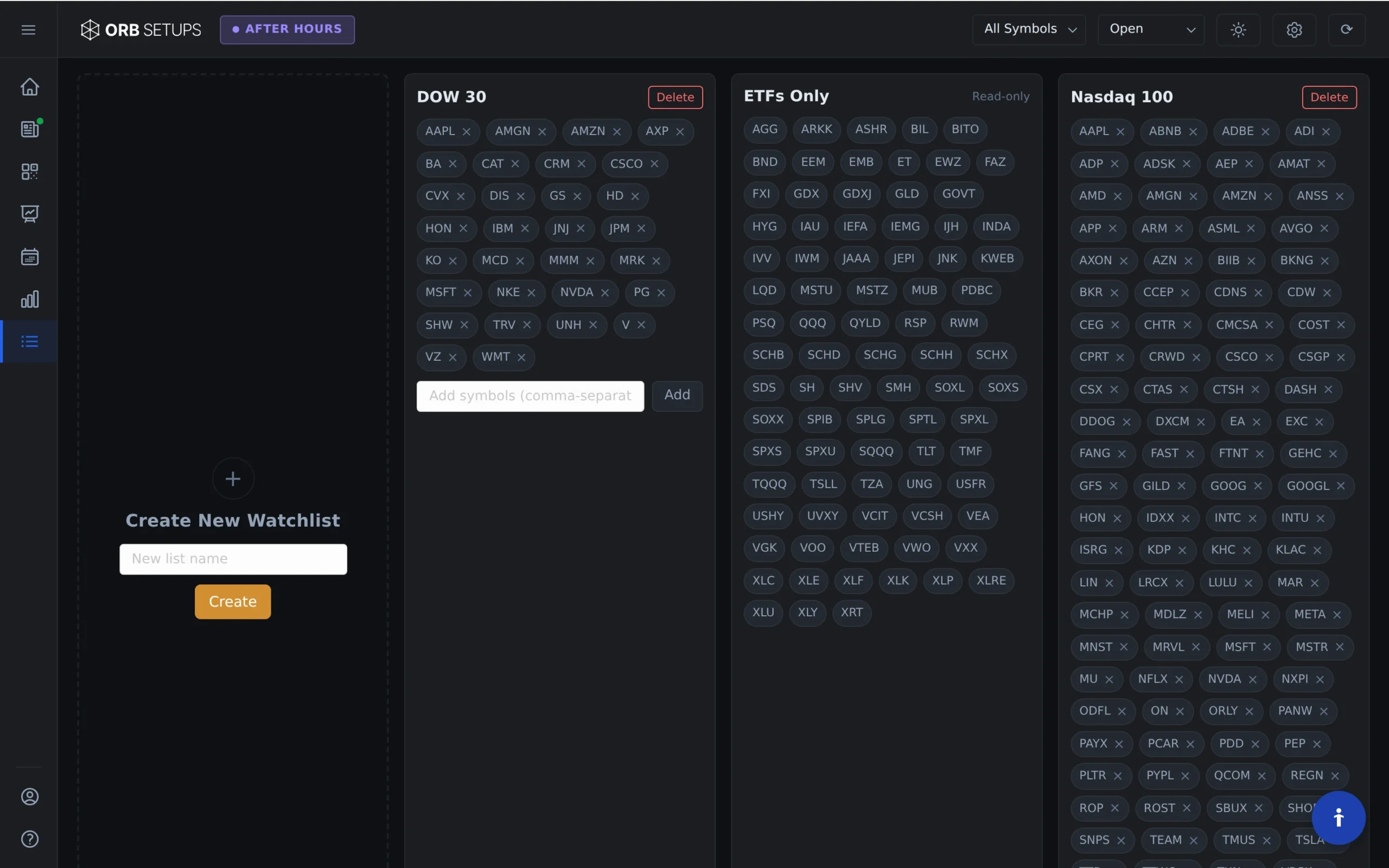
Step 1: Open the Watchlist Page
Navigate to the Watchlist page inside the ORB Setups platform.
Step 2: Name Your Watchlist
Enter a unique name for your watchlist. Each watchlist must have a distinct name. For example, if you already have a watchlist named “Tech Favorites,” you’ll need to use a different name like “Tech Favorites 2” or “Tech Leaders.”
Step 3: Add Symbols
Add the stock and ETF symbols you want to include. You can add as many symbols as you need. Choose from any of the 600+ symbols available in the ORB Setups scanner.
Step 4: Save Your Watchlist
Click “Add Watchlist” to save. Your new watchlist is now available in the Live Scanner.
Using Your Watchlist in the Live Scanner
Once you’ve created a watchlist, select it from the dropdown menu in the Live Scanner. The scanner will filter results to show only ORB setups from symbols in that watchlist.
You can switch between watchlists at any time, or select “All Symbols” to scan the full universe of 600+ stocks and ETFs.
Managing Your Watchlists
You can create unlimited watchlists to organize symbols by:
- Sector (tech, healthcare, financials)
- Price range (high-priced vs. low-priced stocks)
- Volatility profile (high ATR vs. low ATR)
- Strategy type (gap plays, momentum names, etc.)
Edit or delete existing watchlists from the Watchlist page as your trading focus changes.